最近の投稿
- P2P地震情報 API2026-11-01出張中に地震もあったりで、P2P地震情報 API の通知を使えないかと考えてみた。 […]
- pnrcon.net からメール送信?2026-10-30DMARC を運用しているけど、自宅ドメインを語ったメールが送信されたとの報告。ちょっと不気味だな。 […]
- switchbot の munin プラグインを multigraph 化2026-10-23自宅内を switchbot で色々と管理できるようになったけど、温湿度測定の対象も増えてきたら、munin […]
 php2shell の対応2026-10-22PHPの更新が前日に予告され、一斉更新がかかるという流れは、かなり重大。 […]
- Ubuntu 26.10 への更新(mariadbトラブル)2026-10-15Ubuntu 26.10 の公開に合わせて、自宅サーバの do-release-upgrade -d […]
netplanの問題?ネットワークが切れる
新しいサーバに移行したけど、ネットワークが勝手に切れる。当初、Debian をインストールをしたときには、ネットワークインタフェース自体が消えていたので、ドライバーがうまく動いていないと思われたが、今回は Ubuntu に入れ直ししているし、ifconfig -a でみても、インタフェースは動いているものの、IPアドレス勝手にダウンしている。
netplan の設定トラブル
Gemini で質問したら、アドレス固定設定で登録した netplan の構文エラーとの指摘。でも警告を直しても相変わらず切れる。
netplan の設定ファイルは、Gemini の提案を手作業で登録したけど、netplan, Network-Manager との絡みの問題で、相互が設定をおかしくしている可能性がある。ということで gnome 設定 – ネットワークで固定アドレス設定で登録したら、安定した…の…かなぁ…
ssh多段ログイン
自宅のサーバ更新で、公開しているサーバの奥にある自宅内端末にログインする機会も多い。
あるんだろーなと調べるとやっぱりあるね、ssh 多段ログイン。”-X”オプション x11-forward も動くじゃん。
x11-forward で google-chrome 開くと、最初はフォントとかいろいろやりとりがあって立ち上がりは遅いけど、普通に動くな。
((( ssh多段ログイン )))
$ slogin user@踏み台サーバ -t slogin user@自宅内別端末

((( ssh X11 フォワード )))
$ slogin -X user@踏み台サーバ -t slogin -X user@自宅内別端末
[自宅内端末]$ xeyes
新しいサーバ用にUSB-Cポートを
7年前のWindows機に Ubuntu を入れてメインの自宅サーバに更新しようと最終段階。今後の使い方も含め、USB-C ポートもつけておこうと安い PCI の USB-C ボードを購入。ロープロファイルのブラケット付きって書いてあるのに、ノーマルブラケットしか入っていない。
送り返すのも面倒だし、金属加工で逃げた。
ロープロファイル加工を終えて、サーバにくっつけたけど、USB-C × 2port は普通に使えるけど、縦配置の USB-A 3.0 × 2port は、パソコンのブラケットを支えるフレームの幅が狭く USB-A コネクタが刺すことができない。USB-Cポートが目的なのでひとまず妥協。
接続して起動するが、どうも sytemd-udevd の負荷が発生し、1CPU の loadavg が 100% に張り付いている。相性悪いのかな。2000円ムダにした…(T_T;
USB 切り替え機を導入
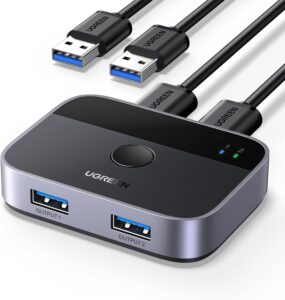
自宅サーバを更新しているけど、Ubuntu Desktop も安定して使えるので、Windows 端末と 新サーバを切り替えることも多い。キーボード・マウス・USBスピーカをまとめて切り替えたいので、USB 3.0切り替えスイッチを導入。Amazon さんから届いて早々につなぐけど、USB が INPUT/OUTPUT 両方が USB-A メスコネクタになってる。だから添付ケーブルがUSB-Aオス/オスのケーブル。USB-Aオス/Aメスとか、USB-A/USB-B の組み合わせじゃないから、差し間違えてひと悩み。
自宅サーバの移行中
メインPCを Windows 10 から 新しいPCを導入し Windows 11 に切り替えたが、データの移行も終わったので、Windows 10 の PC に Linux を入れる。
現状自宅サーバの問題点
現状の自宅サーバは ほぼ 15年に使い始めたが、最近はマナーの悪いクローラで負荷が高くなったり、smartd から エラー警告が出る(root ではない)ようになっているし、これを契機にサーバ移行中。1台の PC を 15 年運用というのも我ながらすごいな。
しかし、Core i3 第5世代の CPU から Core i7 の第7世代で処理速度も約4倍になってるし、SSD なので全体的に処理速度も大幅改善。
OS は Debian 13(trixie) から Ubuntu 24 に
OSは、設定移行も考え、同じ Debian にしようと作業を始めたが、ネットワークデバイスのドライバがまずいのか、時々 切れてしまう。処理速度もまともなので、デスクトップでも使うと思うし Ubuntu 24 Desktop に変更。最新 firmware のパッケージをいれて適切なネットワークデバイスが選ばれたのか、ネットワークも安定。
デスクトップも、デフォルト設定が Debian より使いやすいし便利。
ついでに、FireWall の管理は長年 ferm を使っていたけど、メジャーじゃないし最新ディストリビューションでは対象外。今回、移行を契機に netfilter + netfilter-persistent に移行。
postfix + opendkim + clamav + saslauthd + dovecot-imapd の設定はほぼ移行が終わったと思うけどなかなか面倒。設定が色々とかみあってて面倒。設定をまるまる移行すると、処理が途中で現行サーバに飛ぶので、移行中サーバ内で処理が留まるように設定しながらの作業中。
munin + nagios4 の環境も移行したけど、まだまだ道半ば。WordPress のインストールとコンテンツ移行が最後の難関かな。
追記:Wordpressの ヘッダ画像
WordPress も移行したけど、古いサーバのデータを完全移行で、どっちで作業していたかわからなくなるので、新しいサーバの WordPress ヘッダ画像を更新。
ライセンス的にいい写真がなかったので、Gemini で画像を生成させた。

Alibaba Cloud LLC からの大量アクセス
自宅サーバで作業していたら、loadaverage 30越えの高負荷。
調べてみると、Web サーバの負荷が高い。一旦 apache を止めると負荷が落ち着く。
早々にアクセス元の IP アドレスを調べると広い範囲の端末からアクセスが集中している。ひとまず FireWall で下記サブネットをアクセス拒否。
47.79.0.0/20
47.79.96.0/19
47.79.208.0/20
47.82.8.0/21
アクセス履歴の内容を確認すると、アクセス間隔を空けないマナーの悪いクローラーのようだ。
saslauthd の起動で smtpd chroot 解除
postfix の更新が入ったようだけど、以前から postfix 更新のたびに動かなくなることが多かった saslauthd がうまく起動しないトラブルが再発。
postfix での smtpd 起動がセキュリティ対策のために chroot 起動にしていて、saslauthd が chroot のファイルを正しくアクセスできないのが原因。でも、debian の default 設定の 非chroot の設定だし、debian 推奨設定ということで chroot 起動を解除することにした。
homebridge-cmdswitch2更新とchild-bridge機能
homebridge child-bridge
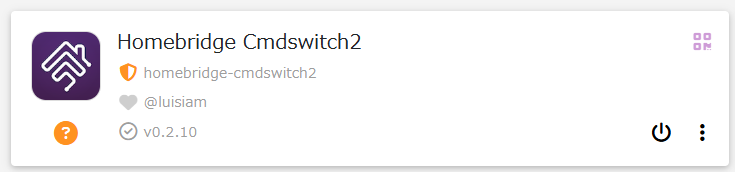
homebridgeの更新の中で、child-bridge という機能が実装された様子。これによる影響なのか、Google Home でつながらない現象が発生していると思われる。homebridge-cmdswitch2 のプラグインが、child-bridge を使うように変更されている。
$ sudo ps ax | grep homebridge
22887 ?        Sl     0:21 homebridge
23934 ?        Sl     0:03 homebridge: homebridge-cmdswitch2
24010 pts/2    S+     0:00 grep homebridge
{
    "platform": "cmdSwitch2",
    "name": "cmdSwitch2",
    "switches": [
        {
            "name": "テレビ",
            --(略)--
        }
    ],
    "_bridge": {
        "username": "0E:7D:87:xx:xx:xx",
        "port": 53178
    }
}
これにより、child bridge が別の homebridge のように見えていると思われるので、Google Home 側で別デバイスとして child bridge を認識させないとダメということかな。
homebridge-cmdswitch2 の更新
ただ、cmdswitch2 だけど、プラグインの更新が必要みたい。homebridge-cmdswitch2(ver 0.2.10)は、homebridge-cmdswitch2-no-logs に移行されているようなので、こっちの方が先決かな。
homebridge-cmdswitch2-no-logs の status 監視のトラブル
homebridge-cmdswitch2 の後継プラグインの homebridge-cmdswitch2-no-logs に入れ替えたけど、各機器のON/OFF状態を cec-client でとるように設定し polling 設定をすると、頻繁に状態監視をすることになり、ほかのデバイスの on/off 監視と競合が発生する。このため、polling 設定は削除。
プラグインを更新したら、「child bridge の方がいいよ」といった説明も出てこないし、child bridge機能は見送り。
追記:homebridge-cmdswitch2 に戻す
cmdswitch2-no-logs に切り替えたけど、”OK google, テレビをつけて”と命令すると、テレビを消す動作はするものの “homebrigeに接続できません” と言われる。
しかたがないので、homebridge-cmdswitch2 に戻し、child-bridge ナシの設定とする。
朝につながらないSwitchbot
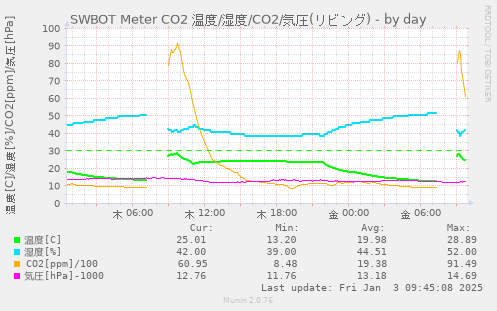
なぜか2日つづけて、朝7:00-9:00 の間に Switchbot につながらないのが発生。
LOGをみると 内部エラー(190) のステータスコードが帰ってきている。
Switchbot APIが急に動かなくなった
Switchbot のデータを、OpenWonderLabs / Switchbot API v1.1 を使って munin でグラフ化していたが、2024/12/16,16:35(JST) から急にデータが取れなくなっている。
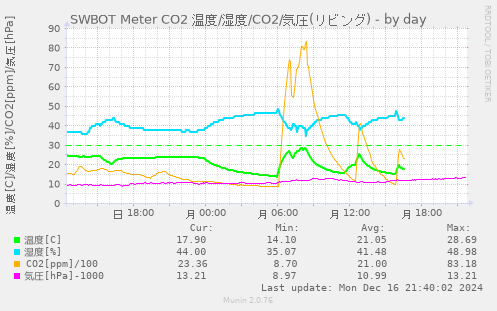
自作の Shell Script の問題かと思ったが、Python のコードでも Forbidden が表示されるので、原因は別かな。
api.switch-bot.com のトラブルかなぁ…
t=1734352549278
nonce=83e7a2f9-7ece-4971-9157-9aac14cd229f
sign=Frytn5FFDK0dUYE9XUEQF+v30V1WhAGKIo4qHAMiy7I=
{
  "message": "Forbidden"
}
(2024-12-17追記)
2024/12/17(火) 12:00 に復旧した様子。こっちで特に何かしたわけでもなく、勝手に復帰した。
やっぱりサーバの問題だろうな。
復帰状態でブラウザで https://api.switch-bot.com/ にアクセスすると、Forbidden じゃなく { “message”:”Missing Authentication Token” } が表示される。(昨日トラブル時は Forbiddenだった)
Switchbot さんには、先日 温度計の battery 項目が 100% で正しい値が取れないって報告してるし、その辺の修正が利いてないかと期待したけど、相変わらず 100% だな。
Google 検索