homebridge-gsh で接続できず再設定
数日前から、Google Home から照明やエアコンを操作していたのが動かなくなる。
しかたがないので、Google でアプリ連携を削除、Google Home で接続を完全に削除してから、改めて homebridge-gsh を再設定となった。以前にもつながらなくなっているので、原因は不明だけど homebridge の更新などの影響だろうか。


エアコン更新で電力量減
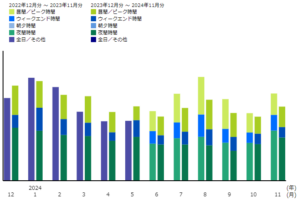
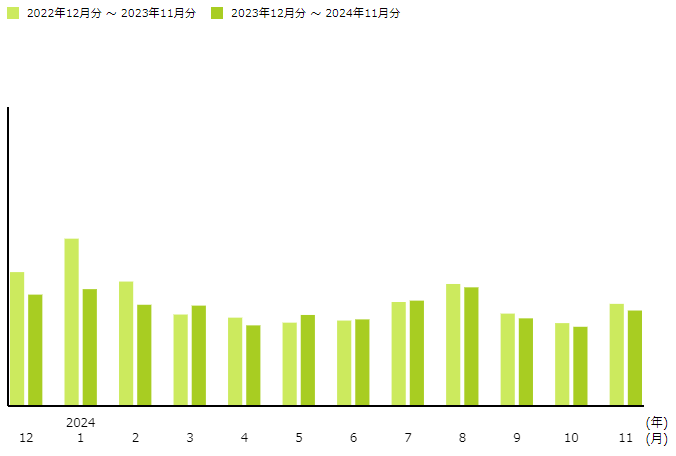
電気代を確認するページを久々にチェック。今年の夏も暑かったけど、電気使用量が減ってる。リビングと子供部屋のエアコンを更新したおかげかな。でも、電気利用料の減少分ほど電気代が減ってない。電気料金アップもあるし、増えてないだけマシかな。
電子レンジご飯炊き
|
||||||||||||||||||||||||||||||
炊飯
MuninでSwitchBot CO2センサーのプラグイン
Muninで、Switchbot の CO2 センサーをモニタリングするためのプラグイン
#!/bin/bash

#%# family=auto
#%# capabilities=autoconf

available="yes"

#
# SwitchBot
#
token="xxxxxxxxxxxxxxxxxxxxxxxxxxxxxxxxxxxxxxxxxxxxxxxxxxxxxxxxxxxxxxxxxxxxxxxxxxxxxxxxxxxxxxxxxxxxxxxx"
secret="xxxxxxxxxxxxxxxxxxxxxxxxxxxxxxxx"
swbot_url="https://api.switch-bot.com"

# for v1.1
url_list_v11="${swbot_url}/v1.1/devices"
t=$(/bin/date +%s%3N)   # time = Epoch time 13 digits
nonce=$(/usr/bin/uuidgen)   # uuid
sign=$(echo -n "$token$t$nonce" | /usr/bin/openssl dgst -sha256 -hmac "$secret" -binary | /usr/bin/base64 -w 0)

# SwitchBot meter CO2センサーのデバイスID
deviceId="xxxxxxxxxxxx"

function status() {
    url_list_v11_meter="${url_list_v11}/${deviceId}/status"
    /usr/bin/curl -s --request GET \
          -H "Content-Type: application/json" -H "Authorization: ${token}" \
          -H "sign: ${sign}" -H "nonce: ${nonce}" -H "t: ${t}" \
          "${url_list_v11_meter}" \
    | /usr/bin/jq -r '.body | "temperature.value " + (.temperature|tostring) + "\nhumidity.value " + (.humidity\
|tostring) + "\nCO2.value " + (.CO2|tostring)'
}
case $1 in
    autoconf )
        if [ "$available" = "yes" ]; then
            echo "yes"
            exit 0
        fi
        ;;
    config)
        echo "graph_title     SWBOT Meter CO2 温度/湿度/CO2 (リビング)"
        echo "graph_category  sensors"
        echo "graph_vlabel    温度[C]/湿度[%]/CO2[ppm]"
        echo "graph_args      -l 0 -u 70"

        echo "temperature.label   温度[C]"
        echo "temperature.draw    LINE2"
        echo "temperature.colour  00FF00"
        echo "temperature.warning 30"

        echo "humidity.label  湿度[%]"
        echo "humidity.draw   LINE2"
        echo "humidity.colour 00E0FF"

        echo "CO2.label     CO2[ppm]/100"
        echo "CO2.draw      LINE2"
        echo "CO2.cdef      CO2,0.01,*"
        #echo "CO2.warning  25"
        exit 0
        ;;
esac
status
Muninで取得した値を、nagios4 で確認するためのプラグイン。
#!/usr/bin/perl

use strict ;
use warnings ;

use Net::Telnet ;

my $telnet = new Net::Telnet( Host => "127.0.0.1" , Port => 4949 , Timeout => 30 ) ;

$telnet->open() or die( "Can't connect" ) ;
$telnet->waitfor( '/#.*$/' ) ;

# munin で読み込む項目を指定
$telnet->print( "fetch switchbot_meter_co2\n" ) ;

my $flag = 0 ;
my %value = () ;

# データを読み込む
while( my $line = $telnet->getline() ) {
    last if ( $line =~ /^\.$/ )  ;
    if ( $line =~ /^([0-9a-zA-Z_]+)\.value\s+([\.0-9]+)\s*$/ ) {
	$value{$1} = $2 ;
	$flag = 1 ;
    }
}
# nagios プラグインとして範囲を確認
my $st = 0 ;
my $item = "-" ;

my %status = ( 0 => "OK" , 1 => "Warning" , 2 => "Critical" , 3 => "Unknown" ) ;

if ( exists( $value{'temperature'} ) ) {
    if ( $value{'temperature'} > $ARGV[1] ) {
	$st = 2 ; $item = "temperature" ;
    } elsif ( $value{'temperature'} > $ARGV[0] ) {
	$st = 1 ; $item = "temperature" ;
    }
}

if ( exists( $value{'CO2'} ) ) {
    if ( $value{'CO2'} > $ARGV[3] ) {
	$st = 2 ; $item = "CO2" ;
    } elsif ( $value{'CO2'} > $ARGV[2] ) {
	$st = 1 ; $item = "CO2" ;
    }
}

if ( !$flag ) {
    $st = 3 ; $item = "Error" ;
}

# 最終結果の出力
printf( "SBMT_MeterCO2 %s %s %2.1f[C] %2.0f[%%] %4.0f[ppm]\n" ,
	$status{$st} , $item ,
	$value{'temperature'} , $value{'humidity'} , $value{'CO2'} ) ;

exit $st ;
Nagios のプラグインを Perl で書いておいたけど、少しでも軽い処理にしたいので lua(lua50) で書き直し
#!/usr/bin/lua

local temp , hum , co2 ;
local temp_w_max , temp_c_max = 25 , 30
local hum_w_max ,  hum_c_max  = 11 , 22
local co2_w_max ,  co2_c_max  = 2500 , 5000

function find_value( str , pattern )
   local p_start , p_end = string.find( str , pattern )
   local s_val = string.sub( str , p_end + 1 )
   local p_nl  = string.find( s_val , "\n" )
   local val   = string.sub( s_val , 1 , p_nl )
   return tonumber( val )
end

-- 温度条件
if table.getn(arg) >= 2 then
   temp_w_max = tonumber( arg[1] )
   temp_c_max = tonumber( arg[2] )
end

-- 湿度条件
-- if table.getn(arg) >= 2 then
--    hum_w_max = tonumber( arg[1] )
--    hum_c_max = tonumber( arg[2] )
-- end

-- CO2条件
if table.getn(arg) >= 4 then
   co2_w_max = tonumber( arg[3] )
   co2_c_max = tonumber( arg[4] )
end

fh = assert( io.popen( "/usr/bin/echo -e 'fetch switchbot_meter_co2\nQUIT\n' | /bin/nc 127.0.0.1 4949" , "r" ) )
lines = fh:read("*a")
fh:close()

temp = find_value( lines , "temperature.value" )
hum  = find_value( lines , "humidity.value" )
co2  = find_value( lines , "CO2.value" )

if temp >= temp_c_max then
   mes = "Critical temperature"
   ret = 2
elseif temp >= temp_w_max then
   mes = "Warning temperature"
   ret = 1
elseif co2 >= co2_c_max then
   mes = "Critical CO2"
   ret = 2
elseif co2 >= co2_w_max then
   mes = "Warning CO2"
   ret = 1
else
   mes = "OK -"
   ret = 0
end

-- 結果を返す
print( string.format( "SWBT_MeterCO2 %s %3.1f[C] %2.0f[%%] %3.0f[ppm]" , mes , temp , hum , co2 ) )
os.exit( ret )
比較検証
「/usr/bin/time -v コマンド」を用いて、各プログラムのメモリ使用量などで比較してみた。lua で書いたものが一番軽量。luac でコンパイルも試したけど、luac で生成されたバイトコードを起動するために、lua コマンドを使うため、コンパイルの効果は薄かった。
Munin の Shell を使った SwitchBot 参照 --    最大メモリ使用量 17,960 kB
nagios4 の Munin 参照の Perl プログラム --   最大メモリ使用量 10,176 kB
nagios4 の Munin 参照の lua5.0 プログラム -- 最大メモリ使用量  2,604 kB
Switchbot 温湿度CO2センサー
最初の確認
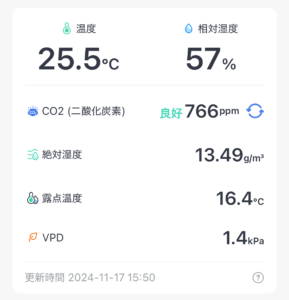
{
  "statusCode": 100,
  "body": {
    "version": "V1.5",
    "temperature": 24.9,
    "battery": 100,
    "humidity": 58,
    "CO2": 999,
    "deviceId": "xxxxxxxxxxxx",
    "deviceType": "MeterPro(CO2)",
    "hubDeviceId": "000000000000"
  },
  "message": "success"
}
Munin, nagios4 でモニタリング
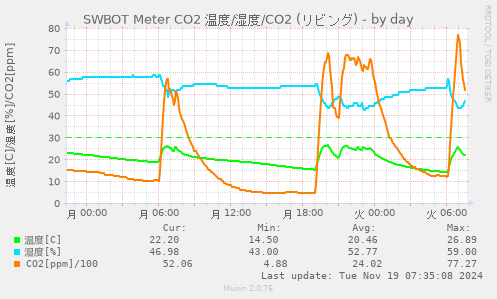
先に、温湿度モニタで実験してあったから、CO2も含めた Munin でのモニタリング、nagios4 での監視も早々に動き出す。
半日ほどモニタリングした状況だと、朝寒く暖房をかけると、1500[ppm]程から、6000[ppm]まで一度に増えている。CO2モニターを販売している製品の資料を見ると、1000[ppm]を越えると眠気や不快感といった記載もあるし、2500[ppm]を越えると健康被害が予想されるといった記載もある。でもストーブ付けたら、簡単に越えてしまっている。
定常状態(部屋に猫1匹)だと500[ppm]ほどか。
Switchbot CO2センサーようやく配送
10/20に注文した SwitchBot の 温湿度 CO2 センサーだけど、かなり待たされた。
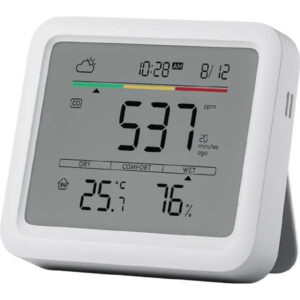
今日は急遽宿直になったし、黒猫なら宿直明けに配送分配所に受け取りに行こうとおもったけど、黒猫のトラッキングIDがない。よくよく見ると 配送 Amazon になってる。そっか、”宅配”じゃないんだ。
Switchbot 温湿度計のファームウェアが更新できない
Switchbot API を使って温湿度計のデータを取得できるようにはなったけど、バッテリー状態は常に 100% 表示。
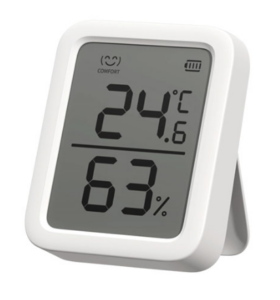
Switchbot の OpenWonderLabs / SwitchBotAPI の README だと、Swichbot 温湿度計の最新は V4.2 と書いてあるけど、アプリで確認するけど、V0.8 の表示。これが原因かと温湿度計のファームウェアの更新をかける(裏ボタンを押しながら乾電池ONでアプリから更新を行う)けど、ファームウェア更新の表示はでるけど、バージョンは相変わらず V0.8 のまま。
原因不明だなぁ…
日立洗濯機API
日立の洗濯機は WiFi で接続できるので、nmap をかけてみたが、反応なし。
でも何気なく「日立 洗濯機 API」でググると、下記の解析した人の情報を見つける。洗濯機の状況を把握できると面白いので色々試してみよう。
ひとまず記事の確認で、UDP ポートの全スキャンすると 50000 からの反応が確認できた。
$ sudo nmap -sU -p- washer-dryer
Starting Nmap 7.94SVN ( https://nmap.org ) at 2024-10-29 16:03 JST
Nmap scan report for washer-dryer (192.168.11.37)
Host is up (0.018s latency).
rDNS record for 192.168.xx.xx: washer-dryer
Not shown: 65534 closed udp ports (port-unreach)
PORT      STATE         SERVICE
50000/udp open|filtered unknown
MAC Address: 9C:2F:9D:xx:xx:xx (Liteon Technology)

Nmap done: 1 IP address (1 host up) scanned in 88.22 seconds
PyCryptodomeのインストール
$ sudo apt install python3-pycryptodome
       or pip3 install pycryptodome
$ sudo apt install build-essential python-dev-is-python3
$ pip install pycryptodomex
$ pip install pycryptodome-test-vectors
$ python3 -m Cryptodome.SelfTest